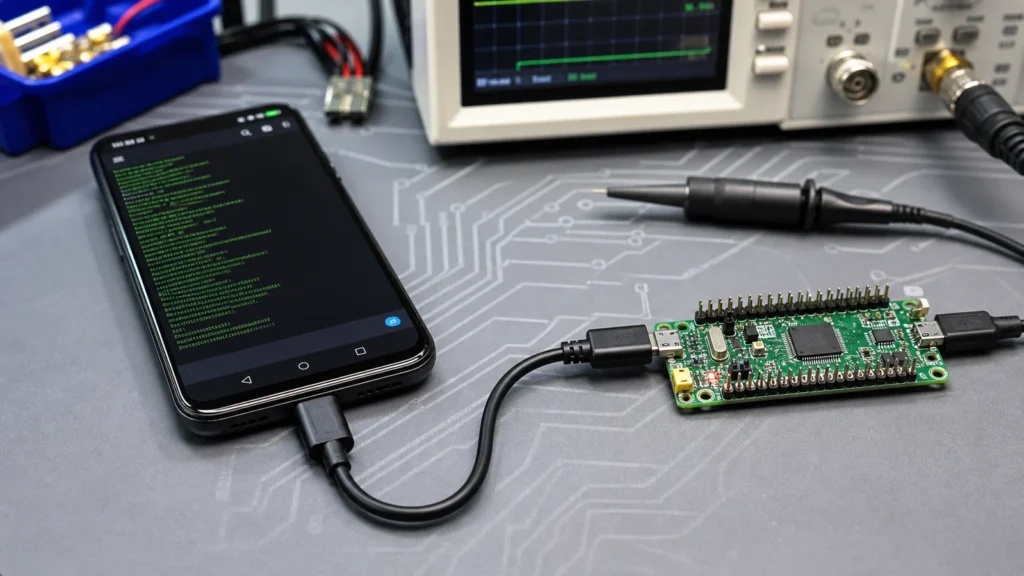
The search phrase “stm32 serialdriver android” usually comes from a practical problem rather than a terminology question. Someone has an STM32 board that already works over USB on a desktop computer, and now they want an Android phone or tablet to read logs, send commands, or control the device in the field. In most cases the real goal is not finding a single magical driver package from ST. The real goal is making Android act as the USB host while the STM32 firmware exposes a USB CDC ACM style virtual COM port that an Android app can open reliably.
That distinction matters because the Android side, the USB class, the cable, and the board power path all affect success. If you treat the issue as only a firmware problem or only an app problem, you can lose hours. A better approach is to trace the entire path from Android host detection, to USB enumeration, to class compatibility, to STM32 endpoint behavior, and finally to the serial framing inside the application.

What this keyword usually means in practice
When engineers search for an STM32 serial driver on Android, they are usually dealing with one of four jobs: reading debug logs from a custom board in the field, sending configuration commands from a service app, updating settings on a battery-powered product without a PC, or building an Android HMI around an STM32-based device.
On Windows, the phrase “serial driver” often points to a vendor-supplied USB VCP package. Android is different. The phone is normally the host, so the important question is whether the Android app can talk to the USB class the STM32 exposes. For a CDC implementation, the host app or its USB stack has to recognize the device, claim the correct interface, and exchange bulk transfers correctly. Some teams use a general Android serial library. Others write directly against Android’s USB host API for tighter control.
Where the driver layer actually lives
The easiest way to avoid confusion is to separate the stack into layers. The STM32 firmware presents a USB device class, often USB CDC for a virtual COM port. The USB cable and OTG adapter let the Android device become the host. Android’s USB host framework detects the device and grants permission. The Android app either handles the interface directly or uses a serial library that already supports CDC ACM style devices.
This is why a board can work perfectly with a desktop terminal and still fail on Android. Desktop operating systems hide much of the enumeration and class handling. On Android, your app has to be more explicit. If the board enumerates but the app cannot claim the right interface, the issue is not solved by changing baud rate text in firmware. If the phone never recognizes the device, the problem may be OTG power or the USB descriptor set instead of serial logic.
STM32-side checklist before you blame Android
Start by verifying the embedded side first. The STM32 must expose a clean and predictable USB device configuration. Use a board and firmware image that already behaves consistently on a desktop terminal. If your device does not work with a known-good PC terminal, Android is not the place to begin debugging. Confirm the USB descriptors, interface count, endpoint directions, and basic transmit and receive behavior. Make sure the device class is really what the Android app expects.
A few embedded mistakes show up repeatedly: the board powers up but the USB data lines are not stable because VBUS sensing or pull-up behavior is wrong; the firmware resets or blocks when the host opens the interface; the CDC implementation sends data before the host is ready, then appears to lock up; or the board exposes composite interfaces that a simple Android serial app does not handle well.
If you are building your own hardware instead of testing on an evaluation board, layout discipline matters too. Keep the USB pair short and matched, protect the connector area mechanically, and review general PCB layout guidelines before assuming the issue is purely software.
Android setup that works more often
On the Android side, reliable projects usually follow a conservative setup path. First, use a known-good OTG adapter or USB-C host dongle. Cheap adapters fail more often than teams expect, especially when the board draws current during startup. Second, test with a simple terminal-style app or a small diagnostic app before you put the serial link inside a full product interface. That isolates permission prompts, enumeration events, and line handling from the rest of the application.
Third, keep expectations realistic about serial settings. With USB CDC, the classic baud rate field may still exist in the app UI, but the transport is packet-based USB, not a legacy UART cable. Some firmware stacks accept line coding changes because host software expects them, but your real bottleneck is often endpoint handling, buffering, or application timing.
Finally, plan for permission handling and reconnect behavior. Android may detach and reattach the device if the cable is disturbed or the power state changes. A robust app listens for attach and detach events, reopens interfaces cleanly, and tells the user whether the problem is permission, power, or link loss.
A practical debug workflow
If the connection still fails, walk through the path in order instead of guessing: check whether Android detects the USB device at all, confirm the device descriptor and interface structure with a diagnostic tool, verify the app has permission to open the device, claim the intended interface and endpoints explicitly, send a minimal command and confirm whether the STM32 receives it, and then send a minimal response back and verify Android reads it.
This method exposes the failure point quickly. No detection usually means cable, host mode, or power. Detection without open access usually means permission or interface handling. Open access without valid traffic often means a mismatch between descriptors, endpoints, or firmware buffering.
If you are also using STM32 tools on the same project, it helps to keep firmware examples and USB support files organized the same way you would keep a clean STM32CubeProgrammer workflow. The less ambiguity in build artifacts and USB middleware versions, the faster your serial debug loop becomes.
Design choices for production hardware
A prototype that works on a bench is not automatically ready for a shipped Android-connected product. If Android connectivity is a real field requirement, decide early whether native USB CDC is the best interface. USB CDC is attractive because it is familiar and simple for debugging. But for production you may prefer a different path if the product has harsh power conditions, untrained users, or a need for frictionless mobile pairing. In some cases BLE, Wi-Fi provisioning, or a dedicated USB bridge IC gives a smoother user experience even if the engineering stack is slightly larger.
If you stay with native USB CDC on STM32, review three production risks: mechanical stress at the connector, power sourcing behavior when connected to phones and tablets, and app support for the exact USB interface profile you expose. This is especially important when the board moves from a development board to a custom design and then into PCB assembly and field service.
When to choose a different architecture
If the Android device is only needed for occasional configuration, a USB serial path is often fine. If the device must stream data continuously, reconnect gracefully, survive cable abuse, and work across many phone models, you should compare alternatives before locking the design.
Choose USB CDC when you want direct wired communication, low software complexity on the MCU, familiar log and command workflows, and a service-tool style connection. Consider another interface when you need better user convenience than a cable, easier power isolation, wider compatibility across Android hardware, or background mobile connectivity with fewer host-mode issues.
Final takeaway
There is no single STM32 serial driver download that solves Android communication by itself. The reliable solution is a working chain: correct STM32 USB CDC firmware, stable USB hardware, dependable OTG host behavior, and an Android app that handles enumeration and data flow properly. Once you view the problem that way, debugging becomes much more predictable.
If your current setup works on a desktop but fails on Android, inspect host mode, interface handling, and power first. If it fails everywhere, fix descriptors and firmware behavior before touching the mobile app. That discipline saves time and produces designs that are much easier to support in the field.
Does Android need an ST-specific STM32 VCP driver?
Usually no. Android communication with an STM32 USB CDC device is typically handled through the Android USB host stack and an app layer that can work with the device class, not a Windows-style vendor VCP installer.
Why does my STM32 board work on PC but not on Android?
A desktop OS often hides class handling and reconnection details. On Android, OTG support, cable quality, app permissions, interface claiming, and power behavior all become visible failure points.
Is baud rate important when using USB CDC on Android?
It can matter for compatibility with host software, but many real problems come from descriptors, buffering, endpoint handling, or reconnect logic instead of the baud number shown in the app.
Should I use USB CDC or a bridge chip for an Android-connected product?
For debugging and service tools, native USB CDC can be a clean choice. For high-volume products that need broader compatibility or easier user handling, a bridge IC or a wireless interface may reduce support risk.