What is BOM sounds like a simple beginner question, but in PCB work the useful answer is not just “bill of materials.” A BOM is the release document that tells purchasing, assembly, test, and often compliance teams which exact parts belong on the board, how those parts are identified, and where revision truth lives when supply pressure or engineering changes start to pull in different directions.
That is why a weak BOM causes more than ordering mistakes. It creates assembly delays, wrong alternates, mismatched footprints, and debug sessions where the board on the bench no longer matches the design intent in the engineer’s head. Once a product moves beyond a one-person prototype, the BOM becomes one of the main ways the organization tells the truth to itself.
What a BOM Means on a PCB Project
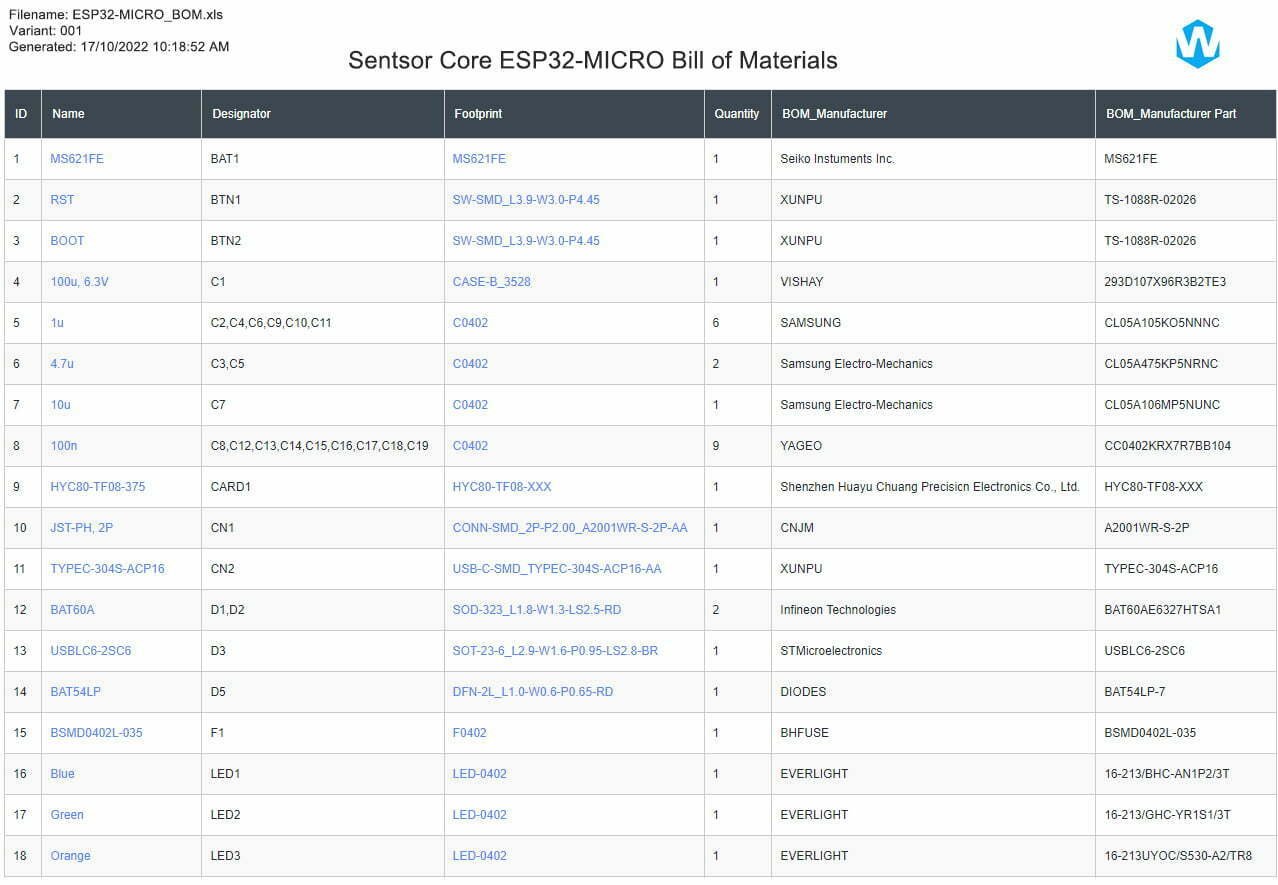
On a PCB assembly project, a BOM lists every part that must be sourced, loaded, or explicitly marked as not fitted for a given board revision. Depending on the company and build stage, that may include reference designators, quantities, manufacturer part numbers, approved alternates, package information, internal part codes, lifecycle notes, and comments about assembly handling.
The key point is that a BOM is not only a shopping list. It is a control document that connects:
design intent from the schematic and CAD library,
procurement reality from approved and available parts,
assembly execution from placement and loading,
test and service expectations from what the finished board is supposed to contain.
If any one of those layers drifts, the BOM stops being a reliable handoff and starts becoming a source of silent risk.
Which BOM Fields Matter Most in Practice
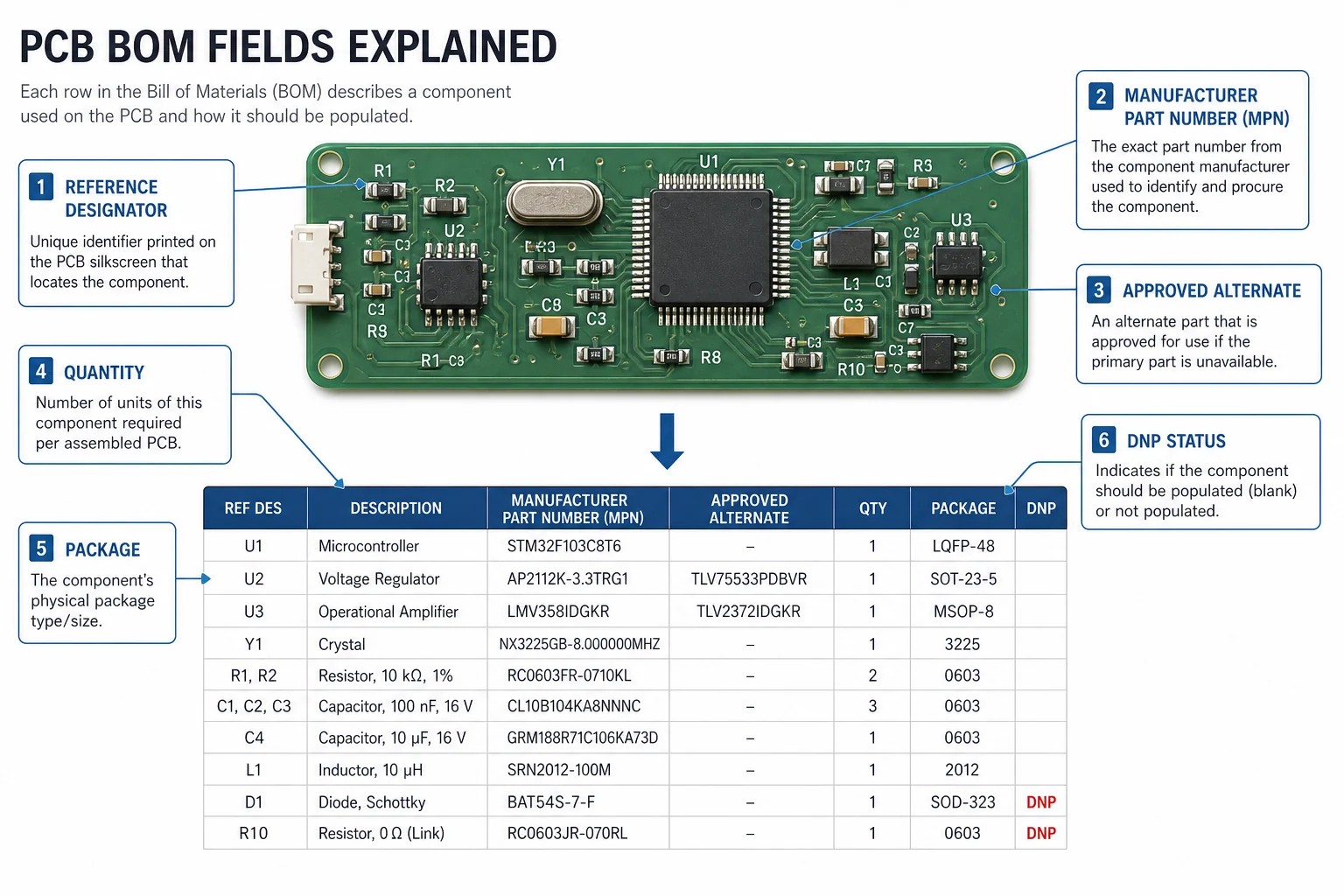
Different organizations format BOMs differently, but some fields repeatedly determine whether the file is safe to use:
Reference designators that match the current layout revision exactly.
Manufacturer part numbers instead of vague distributor-only descriptions.
Quantity per board and whether multiple reference designators share one line item.
Package or footprint context so a buyer does not approve an electrically similar part that cannot actually fit the land pattern.
Approved alternates with rules for when they may be used.
Do-not-populate markers for optional, test, or variant-specific parts.
Teams often underestimate the package field until a substitute arrives with the wrong pad geometry, thermal pad behavior, or height restriction. On paper the part may look equivalent. On the board it may change stencil needs, AOI visibility, rework difficulty, or even enclosure clearance.
What a BOM Does Not Tell You by Itself
A BOM is critical, but it is not enough on its own. It does not replace centroid data, fabrication outputs, assembly drawings, polarity notes, programming instructions, or test expectations. It tells you what parts belong on the board, but not all of the context needed to assemble those parts correctly.
This is where many handoffs break. An engineer assumes the BOM line item “10 uF 25 V X5R 0805” is descriptive enough, while manufacturing needs to know whether only one approved supplier is acceptable, whether a taller alternate hits a shield can, and whether the capacitor sits next to a thermal hot spot that changes derating logic.
That gap is exactly why topics like BOM management checks and eBOM to mBOM handoff discipline matter. The BOM starts the truth, but the rest of the release package has to preserve it.
Why BOM Problems Often Appear Late
BOM mistakes are dangerous because they often stay invisible until another team acts on them. A wrong reference designator grouping may not show up until placement programming. An ambiguous alternate may not hurt until a buyer picks the cheaper part. A missing DNP note may not become obvious until test finds a population option that should never have been loaded.
Procurement sees a sourcing issue.
Assembly sees a line setup issue.
Test sees a board behavior issue.
Engineering sees a revision control issue.
In reality, those may all trace back to the same weak BOM line. That is why a BOM review should happen before release, not only after purchasing raises an exception.
How to Make a PCB BOM More Trustworthy
A reliable BOM is usually built through a few disciplined habits rather than one perfect spreadsheet template:
Keep manufacturer part numbers and approved alternates under revision control, not in email memory.
Match BOM exports to the exact schematic and layout revision being released.
Flag lifecycle, MOQ, or long-lead items before the board enters a rushed build window.
Separate engineering description from procurement description when needed, so both meaning and sourcing stay clear.
Review variant handling carefully if one PCB supports multiple assemblies or loading options.
That discipline becomes even more important in turnkey PCB assembly because the assembler is often responsible for sourcing as well as placement. A vague BOM in that context does not merely create confusion. It directly changes lead time, cost, substitute risk, and the credibility of the build.
The Best Answer to “What Is BOM?” Is About Shared Manufacturing Truth
The beginner definition of BOM is short. The engineering definition is more demanding. A BOM is the part-level truth that lets design, purchasing, assembly, and test operate on the same product without guessing. If that truth is incomplete, each team fills the gap differently, and the board pays the price later.
So when someone asks what is BOM, the best practical answer is this: it is the document that decides whether your PCB build stays aligned once multiple people have to act on the same design. That is why a boring spreadsheet can end up controlling schedule, cost, yield, and rework more than many engineers expect.
FAQ
What does BOM stand for in PCB assembly?
BOM stands for bill of materials. In PCB assembly it is the controlled list of parts, quantities, identifiers, and approved sourcing details needed to build the board correctly for a specific revision.
Is a BOM only for purchasing?
No. Purchasing uses it, but assembly, test, and engineering rely on it too. The BOM helps each team understand which exact parts belong on the board and which substitutions or options are allowed.
Why is the manufacturer part number so important in a BOM?
Because descriptions alone are often too broad. The manufacturer part number ties the BOM to a specific electrical, mechanical, and packaging definition, which reduces the risk of approving a part that looks similar but does not fit or behave the same way.
What is the difference between a BOM and an assembly drawing?
The BOM identifies the parts that belong on the board. The assembly drawing provides placement, orientation, and build-context information. Both are needed because the BOM alone does not tell the full story of how the board should be populated.