What is FT232R USB UART Driver?
FT232R USB UART Driver is a software program used to communicate and transfer data between a computer and USB devices that use UART (Universal Asynchronous Receiver/Transmitter) technology. It is a USB to UART interface designed and manufactured by Future Technology Devices International (FTDI).
The driver enables the computer to recognize and communicate with the USB device, allowing users to transfer data, update firmware, and perform other tasks. The FT232R USB UART Driver is often used in microcontroller programming, Arduino projects, and other electronics applications. It is compatible with Windows, Linux, and Mac operating systems. The driver can be downloaded from the FTDI website or found in software packages that use it.
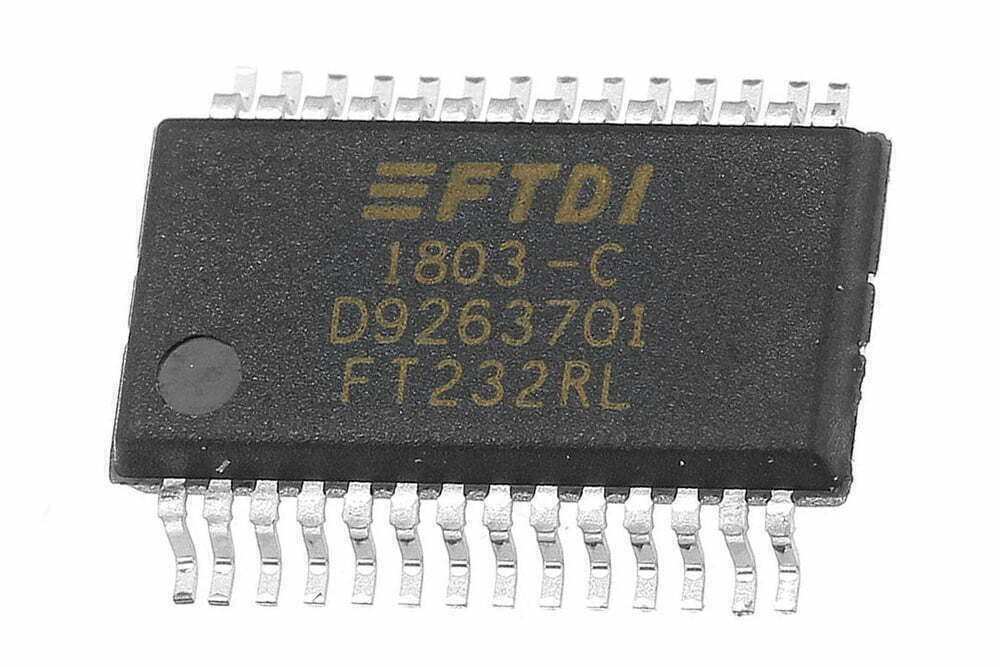
FT232R USB UART IC
The FT232R USB UART IC is a USB-to-serial converter chip that allows a computer to communicate with devices that use serial communication protocols.
FT232R Features
- USB 2.0 full-speed compatible interface for easy connection to host devices.
- Built-in USB termination resistor, which simplifies the design of USB peripherals.
- Support multiple modes of operation, including asynchronous, synchronous and Bit-Bang.
- Support a range of flow control, DTR/DSR, RI, RTS/CTS, and XON/XOFF.
- Support various data formats including 7/8-bit data, 1/2 stop bits, and parity.
- Compatible with a wide range of operating systems, including Windows, Mac OS, and Linux.
- Built-in clock generator that allows it to operate at speeds of up to 3MBaud.
- Easy to use and requires only a single USB port for both power and data transfer.
- Support USB suspend/resume modes for low power consumption.
FT232R Parameters
| Attributes | Value |
|---|---|
| Single Supply Voltage | 3.3V to 5.25V |
| CMOS Drive Output | 5V, 3.3V, 2.8V, 1.8V |
| USB Interface | 2.0 full-speed |
| Baud Rates | 300bps to 3Mbps |
| Transmit Buffer | 128 byte |
| Receive Buffer | 256 byte |
| Clock Frequency | 48MHz, 24MHz, 12MHz, and 6MHz |
| Serial Protocols | RS232, RS422, and RS485 |
| Operating Temperature | -40°C to 85°C |
| Packages Options | 28 Pin SSOP and QFN-32 |
Application
- Arduino boards and other microcontroller development platforms.
- USB-to-RS232 converters and adapters.
- Serial console cables for network equipment.
- USB-based instrumentation and measurement devices.
- USB-based sensors and data acquisition systems.
- USB-based communication modules.
- USB-based programming interfaces.
FT232R USB UART Driver Download and Installation
The FT232R USB UART driver allows Windows, Linux, or macOS to recognize an FT232R-based USB-to-serial interface as a virtual COM port or as a device accessed through FTDI’s D2XX driver. For most embedded development and serial debugging tasks, the VCP driver is the simplest choice.
VCP Driver vs D2XX Driver
The VCP driver creates a COM port that can be used by terminal software, MCU programming tools, and serial monitors. The D2XX driver gives software direct access to the FTDI device and is mainly used by custom applications that need lower-level control.
How to Check the COM Port in Windows Device Manager
After installing the driver, open Device Manager and check the Ports section. A working FT232R USB UART device should appear with an assigned COM number. If it appears under Other devices or shows a warning icon, reinstall the driver, change the USB cable, or test the module on another USB port.
FT232R USB UART Driver Troubleshooting
| Symptom | Possible cause | What to try |
|---|---|---|
| No COM port appears | Driver missing or bad USB cable | Install VCP driver and test another cable |
| Code 10 error | Driver conflict or unsupported device | Remove the device and reinstall a compatible driver |
| Serial data is unreadable | Wrong baud rate or voltage-level mismatch | Match UART settings and confirm 3.3 V/5 V levels |
| Device disconnects | Power instability or poor connector contact | Check USB port, cable, and module solder joints |